Office 2007 is the Bravest Upgrade Ever

June 19, 2006

Embed:

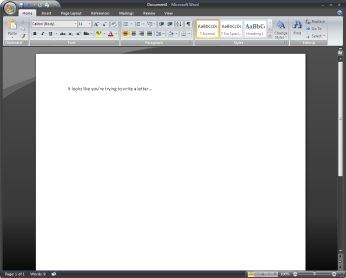
Office 2007 Short and sweet, the Ribbon and new UI in Microsoft Office 2007 is the ballsiest new feature in the history of computer software. I've been using Office 12 for about six months, and not only has it made me more productive, I'm struck by the sheer ambition of the changes in this version.

To clarify the point: Microsoft Office is a bigger business than most of us probably realize. Office generated $11.5 billion in revenue for fiscal year 2005, and it'll exceed that in the current calendar year. But conservatively, you're talking about a billion dollars a month.

Now, most of us who like to prognosticate and pontificate about software like to say things like "It'd be easy to just..." or "It's trivial to add..." but the thing is, most of us aren't betting our entire careers on the little tweaks and changes we'd like to make to our productivity applications. Try making a mistake that jeopardizes a business that makes $250 million a week. I'd figure a 2% error, on the order of $5 million, gets you very, very fired. Maybe they're forgiving and you can make a 10% error, costing $25 million a week. I doubt it. Most of us would lose our nerve about suggesting radical changes if betting wrong meant betting lots of jobs on making the right call. (Nobody ever got fired for making incremental improvements to Office.)

Now, that being said, there have been really gutsy software improvements before. The leap to OS X from the classic Mac OS was huge, but revenues were much lower for Apple then, and the risk was mitigated by Apple's tight control over hardware and software integration. So, the change was radical but less gutsy. Windows 95 was a huge change, but it was before most consumers recognized that Microsoft had them by the short hairs, so it didn't feel quite so overbearing, and there was pretty great backwards compatibility. Honestly, Windows 95 was more of a Microsoft necessity than it was a risk -- Windows 3.1 had serious competition for people's future upgrade path.

Microsoft Word 6 (yep, on Windows, not on the Mac) was another software milestone; Getting out of the features war, declaring victory in the desktop applications battle, and starting to focus on usability, discoverability and user tasks marked a huge leap forward for productivity applications. Plus we got that little wavy red underline. But this, again, wasn't that risky. Back then, some number of people were going to upgrade their word processor just to see what was new. Netscape 4 was seen as pretty risky at the time, but um... yeah.

So there have been very few bet-the-company style risks, and certainly none from companies as large as Microsoft. What's more, the market for third-party applications on top of Office (er, the 2007 Microsoft Office system application platform) is bigger than most standalone software companies. There's a real risk of jeopardizing those line-of-business customizations that most large organizations use alongside Office. And of course, the 500 stodgy Fortune 500 CIOs who make the purchasing decisions about upgrading Office aren't going to be happy they lost their "File" menu.

Word 2007 has the wacky ribbon But Microsoft did it anyway. They killed the File menu, along with all the other menus. They added a giant, weird circular target up in the corner. They actually use part of the title bar as a menu sometimes. They even changed the default font in all the apps. What's amazing is not just that it works, but that it works so well.

My experience has been the same as most of those who I know that are using the new version: Word went from being frustrating and confusing to fairly straightforward to use. PowerPoint went, in a single upgrade, from being the worst widely-available presentation software to being the best. Excel is a fundamentally different kind of spreadsheet application, focused on presenting information usefully instead of optimizing for the creation of complex formulas.

I used to make a big part of my living doing customizations on top of Office, so I still know it pretty well. It also means I can be a harsh critic of their decisions around the platform. But this time I've got to give it up: By radically changing the user interface in Office 2007, Microsoft made the riskiest bet in the history of commercial software. And I think they're going to win the bet.

Some related links:

76 Comments

Anil, I agree it's a ballsy move. Fortunately, they had the data to back up a number of design decisions they made. Allow me to illustrate with a graphic. 13 billion user sessions make a very convincing argument for radical design changes.

To step back, if giving up a modicum of privacy in the form of attention data means better products of all of us, does that mean those who aren't giving up their attention data are making it slightly worse for the rest of us? Not that I'm advocating forcing anyone to give up attention data, but it would be an interesting conversation to have.

Anil, I agree it's a ballsy move. Fortunately, they had the data to back up a number of design decisions they made. Allow me to illustrate with a graphic. 13 billion user sessions make a very convincing argument for radical design changes.

To step back, if giving up a modicum of privacy in the form of attention data means better products of all of us, does that mean those who aren't giving up their attention data are making it slightly worse for the rest of us? Not that I'm advocating forcing anyone to give up attention data, but it would be an interesting conversation to have.

I use Excel for about 8 - 10 a day. Over the years, I have taught myself many keyboard shortcuts to improve my productivity. Most of those keyboard short cuts rely on using Alt + File Menu Letter. I'm concerned that I won't be able to learn more keyboard short cuts if the file menu is now gone (the ones I do know are now locked into muscle memory)

Mike, the keyboard shortcuts still work. I'm surprised you'd use an alt-file menu shortcut instead of the direct Ctrl-Key shortcuts, though -- are there ones that don't have equivalents?

As someone who teaches adult ed computer classes (Computer Basics, Word, Excel, etc.) at a community college, I will be glad to see toolbars go the way of the Dodo. As for the file menu, that will be interesting to see. Most of the beginning users would move their mouse right past the Save icon to click File>Save. I'll probably also have to have both 2003 and 2007 to show assignments on, because it will take years before the students in those classes wind up on 2007, at work or at home. One thing I'm thankful for is that it's not called Office Vista. Computers are confusing enough to new/casual users without them having to keep straight what their nephew upgraded them to ("I have Windows 2003 at home.").

I think the drama of this move is diminished by the fact that Microsoft's larger corporate customers, who make up a huge slice of Office revenues are basically on subscription programs which include a bunch of other Microsoft software.

If Office12 is a dog, Microsoft is still likely to get their money for at least one more subscription cycle, which gives Microsoft a chance to placate them.

Don't beleive me? Dig up some IT analyst reports (Gartner, etc) on deployment rates of the last few releases of Office among large customers. The numbers are pretty low because a lot of IT organizations figure the disruption hasn't been worth the theoretically productivity gains.

Of course, most of those same customers kept current on their Office licenses so they could upgrade to a later version of Office at their preferred pricing. The cumulative changes across Office12 and Office2003 (and in some cases, OfficeXP), just might be enough to warrant an upgrade cycle this time out.

But then again, it might be too big a change. Time will tell. In the meantime, Microsoft is well buffered against an Office12 flop.

Anil -

"I'm surprised you'd use an alt-file menu shortcut instead of the direct Ctrl-Key shortcuts, though -- are there ones that don't have equivalents?"

Look at the Excel 2003 menu. There are many more commands without ctrl-key equivalents than with.

The ribbon is a ballsy move, especially considering how severely the Office developer has been cut out of programming of the UI.

In addition, I can't imagine how you could say you are more productive in 2007. I find myself having to use two to three times as many mouse clicks, and often visit twice as many dialogs, to do the same things in 2007 as I had to in 2003.

There are some great new features in Excel (the larger grid, table formatting, pivot tables, etc.), but I don't feel that the ribbon is one of these. The ballyhooed visual effects in charts and other graphics will be as much a distraction as a useful enhancement. It will be hard to justify the upgrade to 2007.

"Excel is (...) focused on presenting information usefully instead of optimizing for the creation of complex formulas."

Well, as far as I read so far, new Excel is far from being a tool for presenting information usefully. See the review by Stephen Fay:
http://www.b-eye-network.com/view/2818

Note that I haven't used it, but Fay is Garr Reynolds of Excel :)

cheers
jarek

Actually the File menu is still there - the only change is that it doesn't look like a menu any more: it looks like a round purely-decorative logo in the corner of the window. If it didn't have a tooltip, I would never have noticed it.
What a "massive" improvement.

http://spirit.valve-erc.com/gfx/StupidFileMenu.jpg

Personally, I've been using the Word beta for about a month, and I can't stand it. I spent 10 minutes looking through every menu to try and work out how to zoom in. (turns out the zoom controls are part of the status bar at the bottom of the window). That's the worst case, but I've had a similar experience with practically every feature I use. Aargh!

Could you possibly be any more of a corporate sycophant?

This is your life?

The Zoom controls are right there on the View tab... the status bar zoom is simply additional convenience.

Anil,
I agree with your take. Ballsy is a great word for it.

I've been using 2007 for about a week now and I'm a huge fan. I've been watching Jensen's blog for months and months now and super excited for the changes.

There's a little hesitation at first of "where'd they hide that feature..." and then it starts to melt away. I'm especially happy because I tried to insert a column in Excel and just by habit typed ALT-I-C and magically, it worked.

Jon Peltier, something that will save you mouse clicks if you haven't noticed is that if you hold down ALT for a few seconds, the Ribbon starts to show you all of the keyboard shortcuts to navigate it.

Its pretty handy when you want to keep your hands on the keys!

Love Word 2007, but I deeply hate the ribbon and the lack of customization. Here's my irreverant take on it:

http://www.thegsblog.com/?p=97

Mainly, for newcomers to Office, 2007 will be a boon. For us veteran experts, we're going to need a training retreat; you do the same things for 15 years every day, it takes a while to unlearn those behaviors.

Mike, ... I'm surprised you'd use an alt-file menu shortcut instead of the direct Ctrl-Key shortcuts, though -- are there ones that don't have equivalents?

I do use many of the CTRL + shortcut, but there are many others that don't have these. For example I freeze panes alot, so I find that it faster to Alt+W then F, to (un)freeze panes. I also use CTL in combination with Alt shortcuts. For example Ctrl+P then Alt+W for print preview.

Most of these combinations are locked into muscle memory, and only takes a fraction of a second for me to do.

I do computer training for a living. I've been using 2K7 regularly since beta 2 became available. Here's the deal from a training/productivity perspective: You will need to retrain practically everyone, but once that happens, you'll get efficiency and productivity in spades. Training ROI in 2K7--based on my own experiences training people--is likely to be demonstrably better than any previous version. Stuff that used to take over an hour to teach can now be done in moments (cover pages in Word, diagrams, to name just two). And at the same time, there's so much new cool stuff in Excel we could create twice as many classes for it as before. The new Excel is simply amazing. Microsoft, to their credit, really did get this right. What seems less compelling to me is why anyone would want to upgrade to Vista (The new round "Office" button at the top looks to be a counterpoint to the new round Windows logo-only start button in Vista).

The little red wavy line came later than Word 6.0. I think it debuted in Word 95.

The tone of these comments simply reinforces Anil's point - that the upgrade is ambitious and success is not guaranteed.

I hate Office 2007, I was all excited when I saw they offered the beta for free, I downloaded and installed.

When my wife makes documents in Office 2003 and I print it with Office 2007 the print comes out gigantic letters all messed up.

The least you should expect from Microsoft is that their Office is backwards compatible.

Anil, you're right. Office 2007 is a major upgrade over 2003. I've been using the beta since it was first released and I've found it satisfactory. There are still minor glitches ... I reckon they'll be gone in the final release. My only gripe with MS Office is the lack of support for handling large volumes of data, be it a 100 page word document with charts and figures or a (very) large spreadsheet. I often find myself splitting my reports into separate files of about 50 pages each to avoid clogging my memory. But besides that, the beta is great.
I read the comments about the "file" menu and keyboard shortcuts. All Office 2003 keyboard shortcuts (including sequences like, Alt + I + B opens the insert page break, section break, etc. dialog box) work in the beta ... of course, one has to remember them. The beta is also backwards compatible, so I had no problems migrating. The neatest feature for me, besides the UI, was publishing as PDF from within Office.

Hi,

I like the new Office too, but there are some minor things I don't understand or have worked out yet which anoy me. For example, why is it every time I open word it opens with a tiny page in the left upper corner (10% zoom). I always have to reset the zoom to my preferd page width zoom manually...

Never mind my last post,
Just change the zoom and save the file as Normal.dotm...

As the world goes, so does everything goes.
Round and round
Fashion,Music, Building, all the same. Goind back to the begining.
Only computers gets more complex and confusing. "A" is writing "Upside down", and given and computer name.
Man just have a way of making sime thing very complex. Just like "breast feeding" and "feeding bottle"

It's a pretty good upgrade. I like it that you can double-click the ribbon and make it disappear.

Also, the quick launch tool bar can be customised with whatever you want, so I have all my 'favourites' on a toolbar underneath the ribbon.

The only thing I can't stand is the two default schemes, xp and vista. The black/grey looks good but is tiring to work with. The blue/blue scheme is horribly bland. I hope MS give more options for the full release.

i use equation editor a lot. but i find the one in office 2003 the best. I've even installed the 2003 version again. I can't use shortcut in the beta version 2007.

Office 2007

Pro
- Equation Editor Far simpler then the previous versions
- Font viewer which changes the font as you scroll through them

Neutrals
- The new interface is not difficult but new, I consider myself well above average when it comes to computer and if I had a problem navigating I can only imagine what average and below average people will have with the new UI
- People will have to relearn Word, Excel, PowerPoint ect.

Negatives
- In 2007 when office 2007 hits the market it will cause a huge problem for middle aged adults to learn office. Some people will have the new office but most will have the older models meaning that at community college around the nation either both will have to be taught in class which might be confusing to the students or separate class will be necessary.
- No office assistant while in college spending sleepless nights writing “links” the cat and his/hers/its antics kept me sane and a smile on my face “links” will be sorely missed and I hope they replace it.
- Retraining for employees in business, for a while business will be able to keep the old office but eventually they will have to switch and thus spend money to retrain their employees on how to use the new office.

In total as an individual I did like it except for the fact they did not include an office assistant but I see problem for companies, for middle aged adults who might have a problem with the change and newbies learning office for the first time.

Grades
For me 8/10
For the world 6/10

BRING BACK LINKS THE CAT!!!!!

In the office I use 2003 Outlook, at home 2002 Outlook becasue of my Dell Axim 3x PDA. I'm trying to decide if I should upgrade home to 2003 or jump to 2007.

Please tell me about the improvements to Microsoft Outlook. Shared calendars, developmental processing (copying - duplicate contact elimination) of the contacts data base.

I nstalled office 2007 in last month. Yesterday, I installed office 2003 without uninstall office 2007. After that, my computer shutdown completed every 10 or 15 mins. Is this power shutdown problem caused by the way I installed office 2003?

Thanks

I installed office2007, and when i opened my old excel documents they did not work properly. I also could not get solver to work in excel, which is a big reason why i use excel. Other plug-ins lilke polymath ODE solver also dont work. Are these going to be fixed when office2007 becomes commercially available?
If not i will continue to use excel2003

Jon Abad:

"Jon Peltier, something that will save you mouse clicks if you haven't noticed is that if you hold down ALT for a few seconds, the Ribbon starts to show you all of the keyboard shortcuts to navigate it."

And waiting a few seconds every time I want to see the keyboard shortcuts improves my productivity how?

Hi Anil and gang!

Just wanted to bring some attention to this website www.office2007releasedate.com - it's got a countdown and some great screenshots. Just thought it would be of interest to viewers.

- K

I am a system administrator evaluating Office 2007 for our environment. I realized that if we upgrade to Office 2007 we are going to have to have user training sessions just to show users how to OPEN A FILE. Imagine someone new to Word 2007 opens the program and wants to simply open a file. The file menu is gone and there is no "open" button. Nice way to make a first impression.

corporate sellout

This has got to be a joke right? Heaven help you!

corp sellout? Just because he likes what you dont? Tomorrow I get a copy from an MS developers conference and will be seeing what I think. In the meantime I am sorry people have to learn new things to keep up with the world but that is the way it goes. The pics I have seen look nice and I have heard great things about teh equation editor.

Good luck and thanks to MS for keeping IT/Helpdesk working :)

I tried the Office 2007 beta and am now using the trial version. I'm still not used to the damned "ribbon," which I find very poorly designed. (Btw, aren't they mixing metaphors here? What do ribbons have to do with windows?) I think the least Microsoft could have done would have been to offer a "classic navigation" option for those of who prefer the File/Edit/View + smaller toolbar options. Would that have been so very difficult? What's with FORCING people to learn an entirely new navigation system? Not everyone will have Office 2007, even in a few years, so those that are trained on this new system who suddenly find themselves on an Office 2000, XP, or 2003 system, will be hard-pressed to know how to use the application. How stupid is that? Who makes these UI decisions anyway?

Honestly, how much were you paid or do you get kick backs from MS? I've used the ribbon for two months now, and still find it frustrating to do just about anything. I'm constantly having to search for how to do tasks that were just a few clicks before.

Microsoft is trying to make it easier for new people to use office, but they are catering the an ever decreasing niche with steadily decreasing average IQ at the cost of making life more difficult to for those of us who have already expended the time and effort to learn the existing system.

I just started using Office 2007 and I'm not comfortable with it yet. I'm very upset about not having an Office Assistant to help me find everything that moved.

"(Btw, aren't they mixing metaphors here? What do ribbons have to do with windows?)"

Yeah, they should have named it "pane." ;-)

Is there a WordPerfect type reveal codes in Office 2007?

I'm using the Word 2007 trial. Problems so far:

1. You can't turn off autocomplete (it's like a popup ad, and if you type Ramesh Sund, for example at the end of a heading and press enter you get Ramesh Sunday).

2. You can't remove or move the ribbon menu bar.

3. You can only have the quick access toolbar in one of two bad positions - taking up the most important area of the screen i.e. the top.

4. The quick access toolbar only has one line, and after that you get a little arrow at the end to get to the rest of your buttons.

5. You can only have one quick access toolbar.

6. The help menu is worse than ever.

7. There's now a bar at the top of document map taking up space where two headings used to go.

8. There's a bug that causes the a style to apply itself to one word instead of the whole paragraph.

9. Adding buttons to the quick access toolbar is hard because the lists of choices are not longer categorised sensibly. Now you have "popular" and "not on the ribbon". The ones that you want are probably not on the ribbon, and when you go there you find a huge list with many repetitions of features giving differing results.

10. Darkly coloured buttons in the quick access toolbar disappear into the black colour scheme.

11. Repagination doesn't work properly in Draft view.

And I could go on.

The main issue MS have ignored is that if you have a small laptop with a horizontal screen, important space is taken up at the top of the screen by the quick access toolbar, the ribbon menu bar (and the ribbon if you want to use that), and by the heading bar of the document map.

And your options to customise have nearly all been taken away. How can removing such an important Windows feature as customisation be an improvement?

I find this upgrade to be bizarre on so many levels. I cannot imagine businesses being happy. People said on the Jensen forum that people should learn it because it will be the future, but I can imagine kids going to job interviews into the future with their shiny new Office 2007 knowledge and being asked, "Can you use Office 2003, or Office 2002, or Office 2000?"

This realease feels like an experiment, which is unfair for long time users.

Martin Gifford.

Our company heard everyones complaints and have brought the menus, and command/toolbars BACK to Office 2007. We agree - there is no reason you can't use both the menus, toolbars and the Ribbon!

You can download the demo at http://www.toolbartoggle.com

ToolbarToggle brings back the familiar Office 2003 interface into Office 2007 so people could still migrate to Office 2007 which is a great product.

Please check out our product ToolbarToggle which enables anyone to have a full working replica of the old menus, and commandbars with full customization features (macros, autotext, new toolbars) as well as floating and docking capabilities too!

Would love to get your feedback!
sales@toolbartoggle.com

I bought Office 2007 recently and I'm seriously considering stopping using it and switching to OpenOffice 2.2

Publisher and Outlook are now the ONLY advantages MS Office have... and even Outlook is inferior to the standard MS Mail in some ways.

I installed Office 2007, tried it for a week and deinstalled it. Menus are a nightmare, performance is a disaster and it doesn't like my old excel documents. I think is a good moment to switch to OpenOffice

Recently our company upgraded a few desktops and they came with Office 2007. I almost had a riot on my hands. We have users who are very efficient at how the process information and they have to be with the volume of work they do. Now with office 2007 they have slowed down and are falling behind. At least the ctrl keys still work on most items. I agree with the previous posts about switching to Open Office. We have recently began a pilot project for bringing linux and openoffice online. All MS would have had to do was provide an option to revert back to the file / toolbar format. Oh well.

I installed office 2007 and originally i was really happy with the way it looks. However when i started trying to work with it i found it really difficult to do things. It is really annoying that i have to re-learn to do things again. And on top of that i have to try and learn again how to create things with VBA, since menus are no longer there. And whats with all the file extentions??? Also, some of the ALT+ shortcuts dont work any more. And its not that i am too old, i am 27 and i have a hard time working with the product. Fortunatelly, the big companies don't just jump to new products since the day they are released so we are still using 2003 at work, and i think this will not change for a long time since productivity as measured by things done/per second is crucial. I believe the new version will be a flop and that most big companies will wait until the next release to upgrade.

Office 2007, with its odd new interface offers NO transitional mode or toggle between Classic and New modes. Incredible! I considered buying one of the several $30 aftermarket products that make Classic menus available. As a teacher of MS-Word and Excel since 6.0, I was baffled about how and where to find the most obvious commands used in older versions. The ribbon may be intuitive for computer-game teeners, but penalizes this experienced user with its extra keystrokes or mouse-clicks just to find the formerly familiar choices.
Worse by far is 2007's hostility toward older files. I opened a 2005 trifold six-panel brochure (older Word file) to update it for a client. The graphics and headings had moved almost beyond recognition. The 2nd-class postal permit box refused to maintain the text 90° to the right and only 1/4 of the garbled box itself printed. Frustrated trying to locate "text-box insert" or format command options, I closed it, re-opened with OpenOffice 2.2. I quickly created a new outlined text frame, rotated its text 90° to the right, printed a successful test file, saved it as a PDF >>> from within OpenOffice itself

To start out on a positive note, there are some nice features that do make a few tasks easier in Office 2007.
now that I've got the positive tone out of the way, to move onto the real guts of this comment:

The benefits are far outweighed by the time wasted in locating functions in the new UI, and the associated frustration.

The ribbon is a Ballsy move? Don't you mean a Balls Up!? that's what custom toolbars were for in previous versions!


As far as other comments talking about the "data" to back it up, how can a change to the UI as radical as this - with no transition path (forget the MS-supplied flash command references, they work, but are *also* an inconvenience to have to use) be implemented by anyone really interested in providing a product that customers really want to use? Having used Office since version 2, 15 years of accumulated habits in terms of where to find things is a really big ask for people to unlearn!
The millions of hours in lost productivity and frustration that this will be causing world-wide is quite possibly the biggest cock-up by Microsoft ever. I've been using Office 2007 for 8 months now, and still tear my hair out in frustration trying to find things - or, knowing where they are, having to make extra mouse moves and clicks to perform tasks that used to be possible with a single move. As a former MS Engineer now doing IT audits and making recommendations, I cannot in good conscience recommend this products to customers - it used to be easy to leave the mandatory "upgrade to the latest version of Office" line in the list of recommendations - but now I tell all of the account managers in our company to beware telling clients to upgrade, as well as telling clients directly that if they are considering getting Office 2007, they need to 1) have a very pressing business NEED for it, and if it really is necessary, to roll it out very gradually, and ensure that they purchase the Office 2003 menu add-in. If in doubt, buy the license, but stick to the older version. Having to customize the ribbon when it was all available on toolbars (that could themselves be customized) is a right pain in the arse. About the only good thing about this product is that we are selling more Citrix servers and putting Office 2003 on them, so that as companies grow, they don't have to suffer Office 2007 being installed onto new desktops.
A few months ago we hosted a sessions for our clients at Microsoft to inform them of the new developments with Windows, Office etc. I nearly died laughing when one of the speakers started talking about the productivity gains to be had by having a consistent user experience for OS and Apps - and this in the same breath as touting the benefits of Vista and Office 2007 - neither of which have any "Classic" style UI options! What a joke! If people weren't forced to go through the fiasco of battling to downgrade their license rights, the numbers adopting it would be far lower than they are at present.

I used to just smile at the Netware / UNIX / Oracle / Macintosh heads who would always knock any and all Microsoft products. although I still work for a Microsoft shop, I have to agree with them.

Thanks to Charles Steinhardt for the comment above - I will download and try toolbartoggle - but having to pay $$ to a third party just to get back work-timne efficiency is a gross oversight of MS that will certainly lose it a lot of customers.

Having read this page to date, it's clear that there are many individual opinions, mirroring my own conflicting thoughts. One point about Vista: it DOES have a classic interface, and I am using it. I've felt since Win95 that MS had a good handle on major UI design changes, but I've always felt too that MS has a problem with not knowing when to stop.
One issue I've had with Office, and will have in spades now, is that helping friends and colleagues, who ask me how to do something, is very difficult. For example, the whole UI for change tracking changed from Word 2000 to 2003 (for the better, for sure), and now it's no doubt unrecognizably changed again (hopefully still as usable as 2003), and then there are the Mac versions -- so telling someone how to do something very simple like seeing the comments I've added to their draft is insanely difficult.
I hope the dire prediction of years lost while we all figure this out turn out not to be the case -- we have more important work to do.

The vast majority of Office 2007 comments are based around Word and Excel. As an Access first edition upwards user I have to say that 2007 is diabolicle. Database development encompases a vast array of small changes on many levels. I have never been so utterly infuriated. Learning a totally new DB development platform... challenging. Switching to Access 2007.. my worst and most unproductive experience ever. None of my clients are interested in retraining costs either. It may be brave it is also inconsiderate to execute the changes in such an inflexible manner.

I have not yet used Office 2007 completely to post comment here.

But I would like to know the Office Assistat feature in 2007 from where I can get in MS Office 2007. please inform?

Leave a comment